

One email, every send
Campaign dashboards tell you how a send went. The email’s own detail page answers a different question: how has this email performed across everything it’s ever been sent in? Open Content > Emails and click an email’s name (not Edit) to land on its detail page. Alongside the preview and metadata you’ll find two cards built from the email’s full sending history: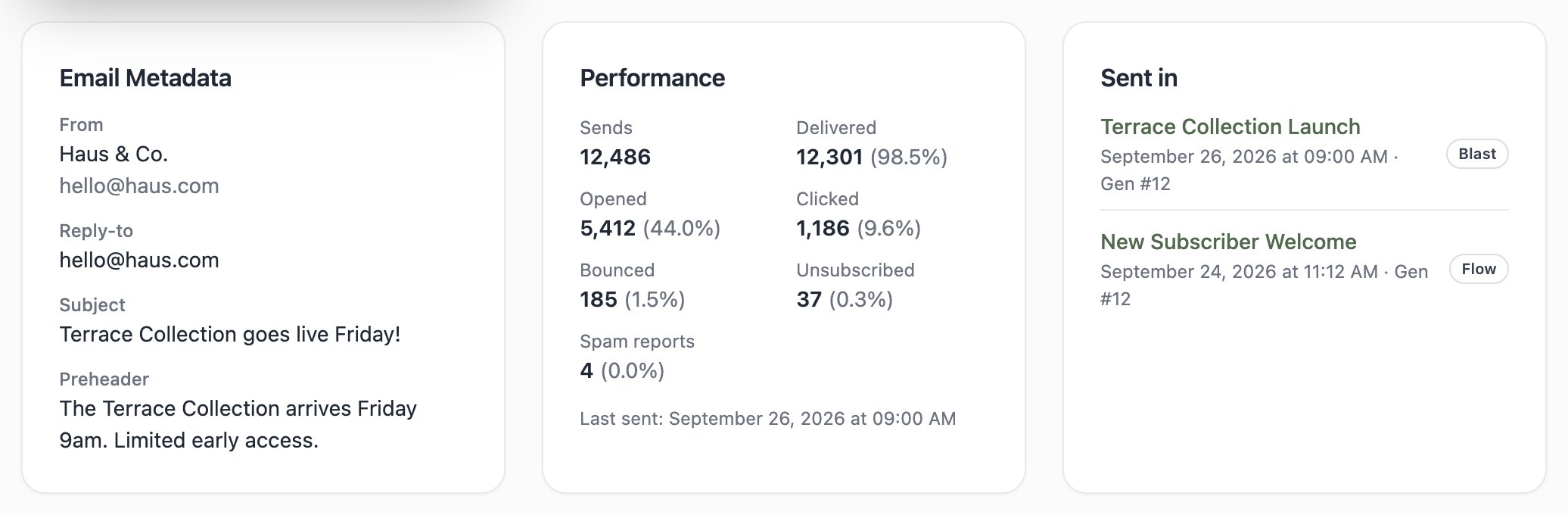
The Performance card
Lifetime totals for this email, rolled up across every blast and triggered-flow send:
The same denominators apply everywhere results appear in Tented: delivery outcomes are measured against what was sent, engagement against what actually reached an inbox. A Last sent line at the bottom tells you how fresh the numbers are; an email that’s never gone out shows “This email hasn’t been sent yet.”
Sample emails don’t count here — their opens and clicks are deliberately excluded from results, so testing your own email doesn’t pollute the stats.
The Sent in card
Sent in lists every campaign that delivered this email, newest first. Each row shows:- The campaign name, linking straight to its results
- A Blast or Flow badge
- The send date and Gen #N — which approved generation of the email actually went out
Drilling into a specific send
For per-campaign numbers and per-contact activity, click through to the campaign itself:- Blasts open a results dashboard where every metric is clickable — see exactly who opened, clicked, bounced, or unsubscribed, with timestamps, and export any bucket as a CSV.
- Flows show per-step stats on their Overview tab, plus a per-contact run history.
What’s next?
Next: A/B Testing
Stop guessing — test up to five variations and send the winner automatically.