

The Art of AI Prompting
Writing effective prompts is crucial for getting the best results from Tented’s AI. A well-crafted prompt can mean the difference between a generic landing page and a perfectly tailored, conversion-optimized page.Prompt Structure
The most effective way to communicate with the AI and achieve great results can be summarized by this formula: Context + Goal + Details + Constraints. This means your prompt should clearly establish the Context (who you are and what you do), define the Goal (what you want to achieve with the page), specify the Details (the specific features and content required), and outline any necessary Constraints (technical or design limitations). Using all four elements ensures the AI has the full scope necessary to deliver a high-quality tent.Example Comparison
Poor Prompt: “Create a landing page” Good Prompt: “Create a landing page for a B2B SaaS project management tool targeting remote teams of 10-50 people. Include a hero section with clear value proposition, key features highlighting collaboration and productivity, pricing tiers for small teams and enterprises, customer testimonials, and a contact form. Use a professional blue and white color scheme with modern, clean design.”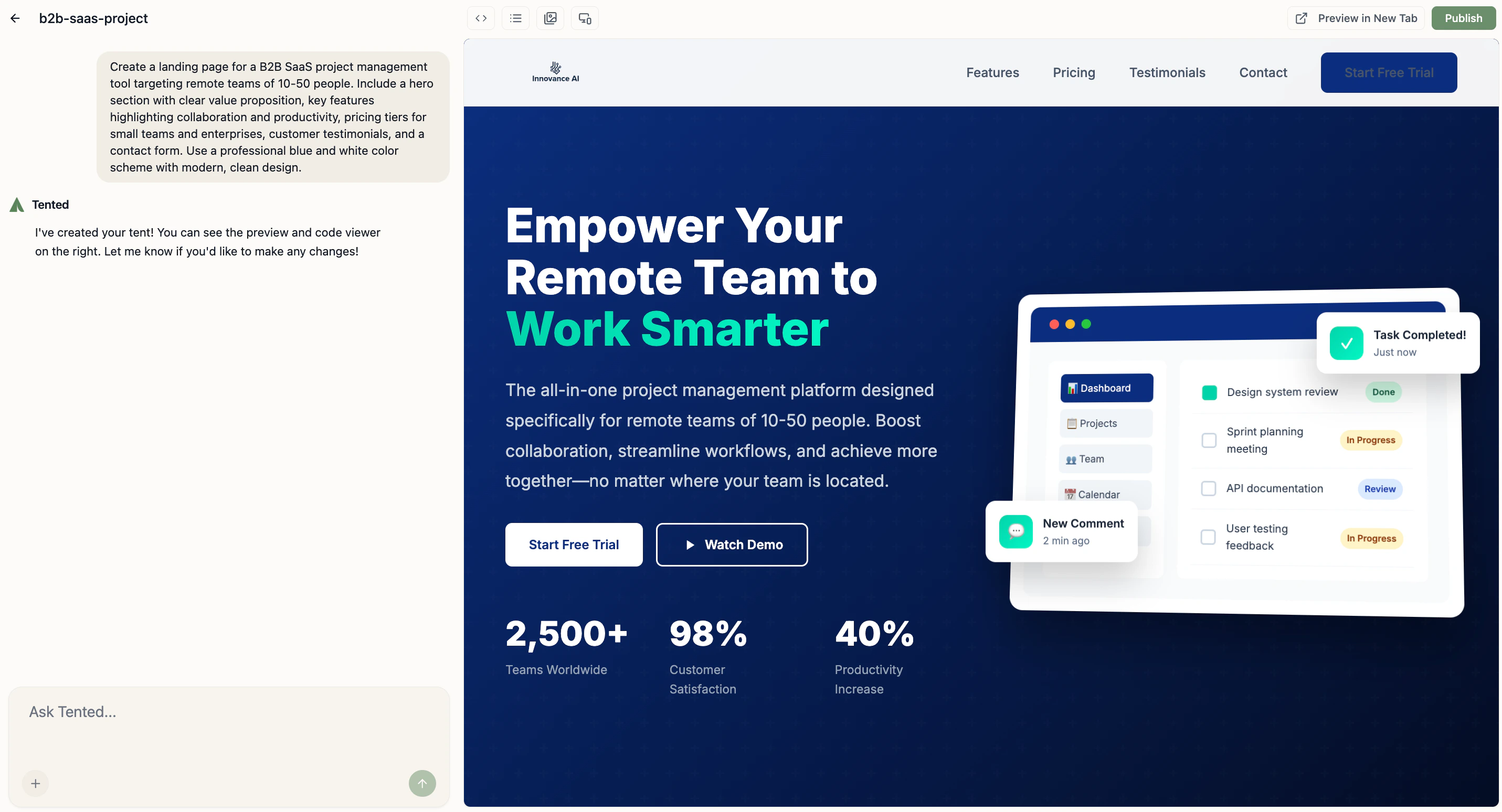
Context Setting
To ensure the AI generates a highly relevant and effective landing page, you must first provide detailed context setting. This initial step involves defining the core environment of the page, specifically detailing your industry and business type and clarifying your target audience. Providing this foundational information ensures the AI understands not only what you sell but also who you’re selling to and why they need your solution.Industry and Business Type
Providing precise information about the nature of your business helps the AI select appropriate language, features, and design elements specific to your sector. Be Specific About Your Industry:- “B2B SaaS productivity tool” vs. “software”
- “Online fitness coaching service” vs. “fitness”
- “AI-powered mortgage rate comparison tool” vs “mortgage software”
- Subscription-based service
- One-time purchase product
- Service-based business
- E-commerce store
Target Audience
Accurately identifying your ideal user is paramount, as it dictates the tone, messaging, and design of your tent. By focusing on your target audience, you enable the AI to craft content that directly addresses the needs and challenges of the people you want to reach. Define Your Ideal Customer:- “Busy professionals aged 25-45”
- “Small business owners with 5-20 employees”
- “Tech-savvy millennials in urban areas”
- “Parents looking for family-friendly services”
- “Teams struggling with remote collaboration”
- “Businesses overwhelmed by manual processes”
- “Consumers seeking convenience and speed”
Goal Definition
After setting the context of your business and audience, the next crucial step is goal definition. Specifying your goals clarifies the desired outcome of the landing page, allowing the AI to prioritize elements that drive user action.Primary Objectives
Conversion Goals:- Lead generation through contact forms
- Product sales and purchases
- Newsletter signups
- Demo requests or consultations
- Establish credibility and trust
- Showcase expertise and experience
- Build brand awareness
- Drive traffic to other channels
Success Metrics
What Success Looks Like:- “High conversion rate for demo requests”
- “Clear path from visitor to customer”
- “Mobile-optimized for on-the-go users”
- “Professional appearance for enterprise clients”
Content Specifications
Content specifications dictate exactly what information needs to be present on the tent, ensuring all necessary selling points, features, and evidence are included. This involves detailing the essential sections and outlining the specific type of social proof required to build trust and drive conversions.Common Sections
Hero Section: The hero section should include a compelling headline and subheadline, a clear value proposition, the primary call-to-action, and a suitable hero image or video. Features/Benefits: For the main body, the features/benefits section must clearly articulate the key product features, corresponding customer benefits, and any unique selling propositions. Social Proof: To build trust, the Social Proof elements should consist of customer testimonials, case studies or success stories, logos of well-known clients, and user reviews or ratings.Content Tone and Style
Defining the content tone and style ensures the AI’s language aligns with your brand identity and communication strategy. This involves selecting a distinct brand personality, which could be professional and corporate, friendly and approachable, innovative and cutting-edge, or trustworthy and established. You should also specify the communication style. Is the content meant to be technical and detailed, simple and accessible, urgent and action-oriented to drive immediate action, or primarily educational and informative? Clarifying both elements helps the AI write copy that resonates perfectly with your target audience. You can specify your communication style in Settings > Brand.Design Preferences
To ensure the final tent is visually appealing and aligns with your brand identity, communicate your design preferences to the AI. This involves specifying the desired visual style and detailing your color preferences.Visual Style
For visual style, you should choose an aesthetic that matches your brand, such as modern and minimalist, bold and attention-grabbing, elegant and sophisticated, or playful and creative. Regarding color preferences, be precise by listing brand colors (specifying hex codes), noting any requirements for industry-appropriate colors or specific psychological color choices, and ensuring all accessibility considerations are met.Layout Preferences
Communicating your layout preferences is essential for guiding the AI on the structural organization of your tent, which impacts user experience and visual hierarchy. You should specify whether you prefer a traditional or unconventional layout. Also tell the AI whether the design priority is mobile-first or desktop-first. Consider defining the content flow, or how the narrative unfolds on the page. Choose between a linear storytelling approach, a problem-solution format, a feature-benefit progression, or a design that prioritizes immediate social proof integration.Technical Requirements
Outlining the technical requirements ensures the generated tent is fully functional and connects seamlessly with your existing technology stack. Detail your functionality needs, such as including specific interactive elements like contact forms with specific fields, newsletter signup integration, social media links, and live chat or support options. Additionally, specify all required integration requirements. These requirements might include connections to your CRM system, email marketing platforms, analytics tracking, and any necessary payment processing capabilities.Common Prompt Patterns
Here are some common prompt patterns you can use as templates for different types of landing pages. Customize the placeholders to fit your specific needs.E-commerce Landing Pages
Template: “Create a landing page for [product type] targeting [audience]. Include hero section with product showcase, key benefits, customer reviews, pricing options, and secure checkout. Use [brand colors] with [design style].” Example: “Create a landing page for premium wireless headphones targeting audiophiles and music professionals. Include hero section with product imagery, sound quality benefits, professional reviews, pricing tiers, and secure checkout. Use black and gold colors with sleek, modern design.”SaaS Product Pages
Template: “Create a landing page for [SaaS product] targeting [business type]. Include hero with value proposition, key features, pricing plans, customer testimonials, and free trial signup. Use [colors] with professional, trustworthy design.” Example: “Create a landing page for a team collaboration platform targeting remote teams of 5-50 people. Include hero with productivity benefits, key features like video calls and file sharing, pricing for small teams and enterprises, customer success stories, and free trial signup. Use blue and white colors with clean, professional design.”Service Business Pages
Template: “Create a landing page for [service type] targeting [location/audience]. Include hero with service overview, process explanation, portfolio examples, testimonials, and contact form. Use [brand colors] with [personality] design.” Example: “Create a landing page for a local web design agency targeting small businesses in the Denver area. Include hero with service overview, design process explanation, portfolio of recent projects, client testimonials, and consultation booking form. Use green and white colors with creative, professional design.”Advanced Prompting Techniques
When creating complex or highly customized tents, you can move beyond simple, one-shot requests. The following methods involve strategically structuring your commands to achieve precise results, incorporating external design influences, and applying strict rules.Iterative Refinement
Start Broad, Then Specific:- “Create a landing page for a fitness app”
- “Make it target busy professionals who want quick workouts”
- “Add a 7-day free trial and highlight mobile convenience”
- “Include success stories from users who lost weight”
Visual References
Include Design Inspiration:- “Use a design similar to Apple’s product pages”
- “Make it look like Stripe’s landing page but for fitness”
- “Apply Material Design principles with our brand colors”
Constraint-Based Prompting
Set Clear Boundaries:- “Keep the page under 5 sections”
- “Use only our brand colors: #2563eb and #ffffff”
- “Include exactly 3 pricing tiers”
- “Make it mobile-first responsive”
Next: Previewing Tents
Learn how to effectively preview and test your tents before publishing.