> ## Documentation Index
> Fetch the complete documentation index at: https://docs.tented.ai/llms.txt
> Use this file to discover all available pages before exploring further.
# Managing Your Subscription
> Change plans, view invoices, and manage billing details
## Where Billing Lives
Click **Plans & Billing** in the bottom-left of the sidebar (or **Workspace Settings > Team & Billing > Plans & Billing**) to open the **Manage Subscription** dialog.
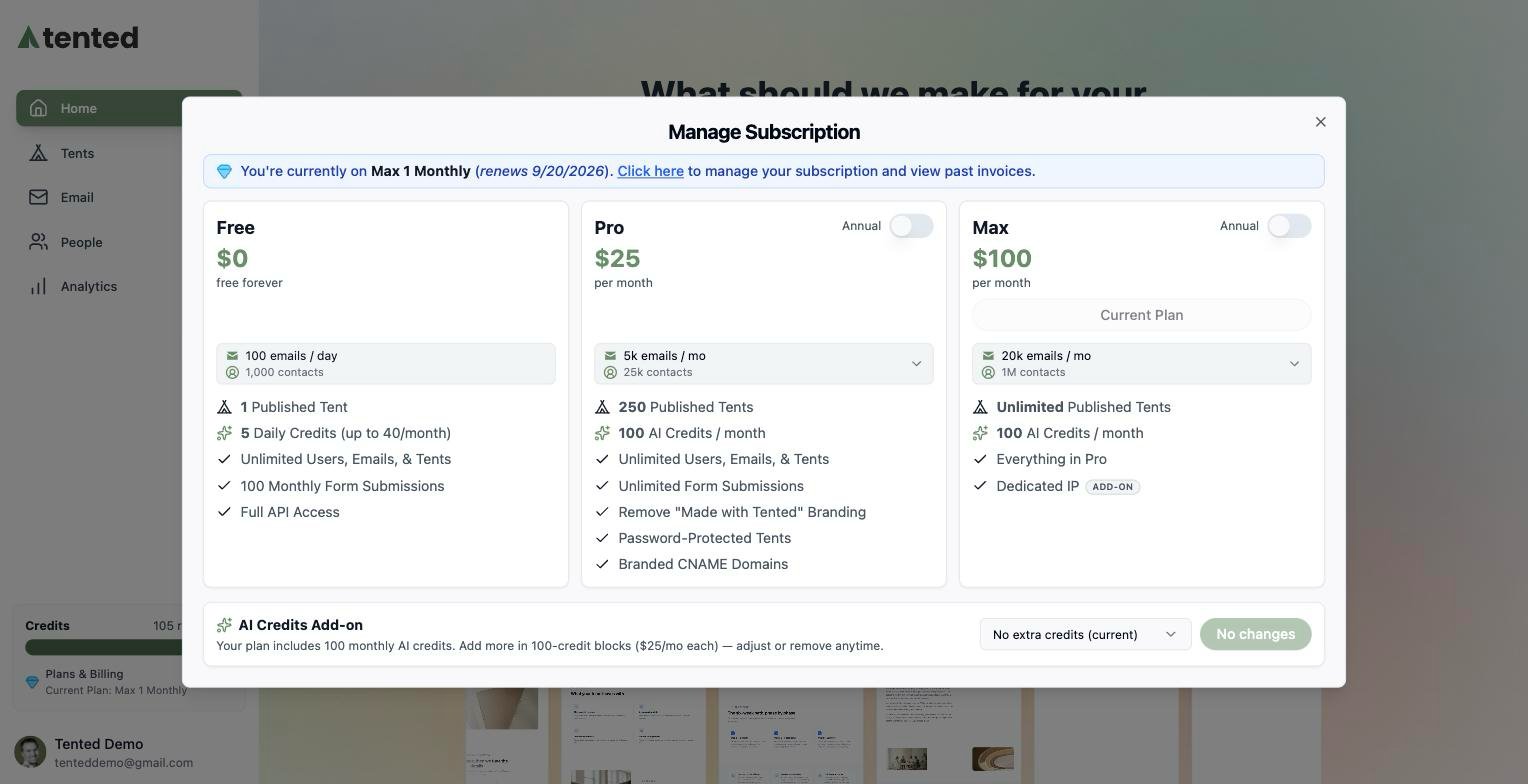 At the top you'll see your current plan and renewal date — for example, *"You're currently on Max 1 Monthly (renews 11/20)"*.
## Common Tasks
* **Change plans** — pick a different plan card. Upgrades take effect immediately.
* **Switch to annual billing** — flip the **Annual** toggle on the Pro or Max card.
* **Adjust your volume tier** — on Pro and Max, use the **emails / mo** dropdown on the card to right-size your email volume and contact allowance.
* **Add AI credits** — every paid tier includes 100 monthly AI credits; buy more in 100-credit blocks with the [AI Credits Add-on](/billing-subscriptions/ai-credits) at the bottom of the dialog.
* **Manage payment details and invoices** — click the **Click here** link in the banner to open the billing portal, where you can update your payment method, view past invoices, and cancel or renew your subscription.
Billing changes are workspace-wide and require an [Admin role](/configuring-tented/user-permissions).
## Keeping an Eye on Usage
Your remaining credits are always visible in the **Credits** meter at the bottom of the sidebar — hover it to see your current billing period. For the full picture, see [Viewing Current Usage](/billing-subscriptions/viewing-usage).
Track credits, sends, and generations across your workspace.
At the top you'll see your current plan and renewal date — for example, *"You're currently on Max 1 Monthly (renews 11/20)"*.
## Common Tasks
* **Change plans** — pick a different plan card. Upgrades take effect immediately.
* **Switch to annual billing** — flip the **Annual** toggle on the Pro or Max card.
* **Adjust your volume tier** — on Pro and Max, use the **emails / mo** dropdown on the card to right-size your email volume and contact allowance.
* **Add AI credits** — every paid tier includes 100 monthly AI credits; buy more in 100-credit blocks with the [AI Credits Add-on](/billing-subscriptions/ai-credits) at the bottom of the dialog.
* **Manage payment details and invoices** — click the **Click here** link in the banner to open the billing portal, where you can update your payment method, view past invoices, and cancel or renew your subscription.
Billing changes are workspace-wide and require an [Admin role](/configuring-tented/user-permissions).
## Keeping an Eye on Usage
Your remaining credits are always visible in the **Credits** meter at the bottom of the sidebar — hover it to see your current billing period. For the full picture, see [Viewing Current Usage](/billing-subscriptions/viewing-usage).
Track credits, sends, and generations across your workspace.