> ## Documentation Index
> Fetch the complete documentation index at: https://docs.tented.ai/llms.txt
> Use this file to discover all available pages before exploring further.
# AI Credits & the Add-on
> How AI credits work, what they cost, and how to buy more
## What credits pay for
**AI credits** power generation — everything else in Tented is free to use. Publishing, sending, importing contacts, and collecting form submissions never consume a credit.
| Action | Credits |
| ------------------------------------------------------------ | -------------------------------------------- |
| Generating a new tent or email | **1** |
| Iterating on an existing tent or email | **0.5** |
| [AI image generation](/working-with-tents/generating-images) | **0.5** per image |
| Chatting without changing the content | **0.5** on Free — **included** on paid plans |
## Your monthly allotment
* **Free** — 5 credits per day (the daily pool resets at 12am UTC), up to 40 per rolling month.
* **Pro and Max** — a flat **100 credits per month**, on every tier. Plan tiers change your email volume and contact allowance, not your credits — and plan credits reset at the start of each billing period.
The **Credits** meter at the bottom of the sidebar always shows what's left; hover it for the period breakdown. See [Viewing Current Usage](/billing-subscriptions/viewing-usage) for the full usage picture.
## Need more? The AI Credits Add-on
Paid plans can bolt extra credits onto the subscription in **100-credit blocks** — **$25/month** per block on monthly plans, **$270/year** on annual. Click **Plans & Billing** in the sidebar to open **Manage Subscription**; the add-on lives at the bottom of the dialog.
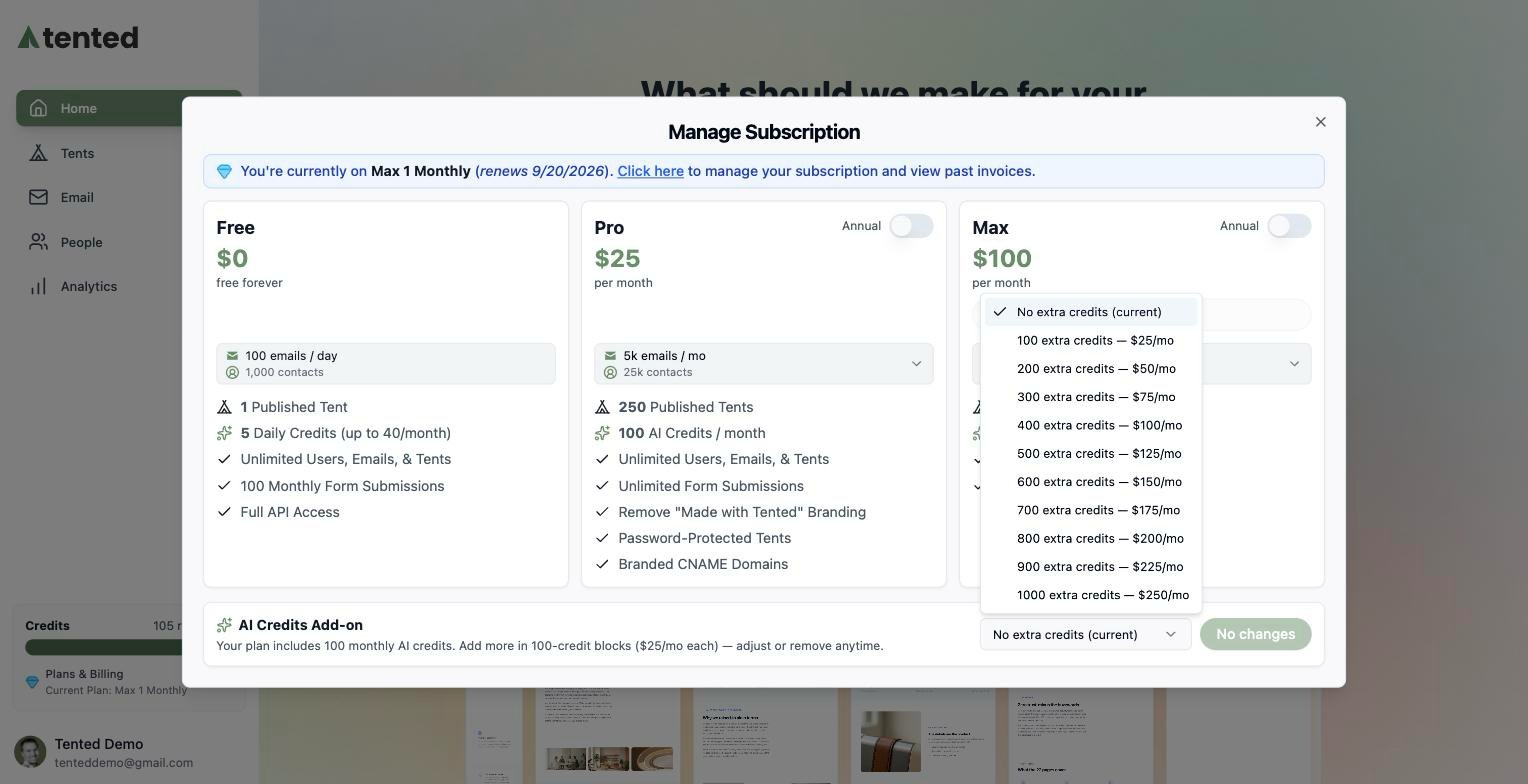
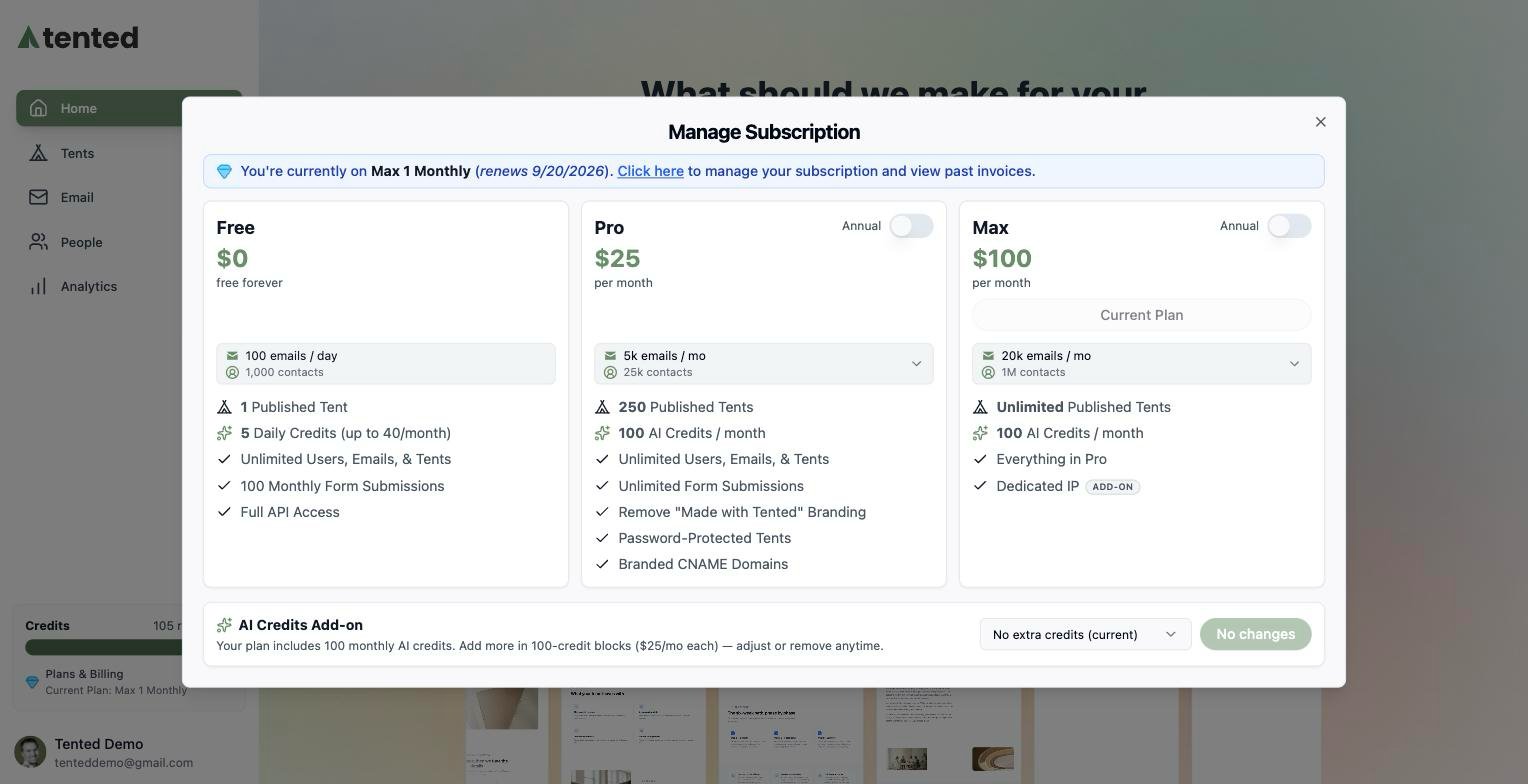 Open the dropdown and pick your **total** extra credits — the price for each option is shown right in the list, and your current selection is marked:
 Pick a higher amount and the button turns into **Add credits**, with the exact billing consequence spelled out underneath — you're charged a prorated amount today, and renewals bill the new total:
 The extra credits are available immediately, and the sidebar meter grows to match.
The add-on tops out at **5,000 extra credits** (50 blocks). The dropdown always offers headroom above what you currently hold, so you can step up as you grow.
## Adjusting or removing the add-on
The same dropdown scales the add-on **down** as well:
* **Decrease** — pick a lower amount and click **Decrease credits**. You keep everything you've already paid for until the end of the current billing period; renewals bill the smaller amount from then on.
* **Remove** — pick **No extra credits** and click **Remove add-on**. Same grace: paid credits stay usable through the period, and the add-on simply doesn't renew.
* **Changed your mind?** Stepping back up within credits you've already paid for is free — the button reads **Restore credits** and there's no new charge.
## When you run out mid-flight
Hitting your credit limit doesn't block you silently — Tented tells you at the moment of generation:
* **Free plans** see a *Daily Limit Reached* or *Monthly Free Limit Reached* dialog with the option to upgrade.
* **Paid plans** see an *AI Credit Limit Reached* dialog showing when your plan credits reset — with the same add-on purchase panel right there, so you can top up and keep working without leaving the flow.
Track credits, sends, and generations across your workspace.
The extra credits are available immediately, and the sidebar meter grows to match.
The add-on tops out at **5,000 extra credits** (50 blocks). The dropdown always offers headroom above what you currently hold, so you can step up as you grow.
## Adjusting or removing the add-on
The same dropdown scales the add-on **down** as well:
* **Decrease** — pick a lower amount and click **Decrease credits**. You keep everything you've already paid for until the end of the current billing period; renewals bill the smaller amount from then on.
* **Remove** — pick **No extra credits** and click **Remove add-on**. Same grace: paid credits stay usable through the period, and the add-on simply doesn't renew.
* **Changed your mind?** Stepping back up within credits you've already paid for is free — the button reads **Restore credits** and there's no new charge.
## When you run out mid-flight
Hitting your credit limit doesn't block you silently — Tented tells you at the moment of generation:
* **Free plans** see a *Daily Limit Reached* or *Monthly Free Limit Reached* dialog with the option to upgrade.
* **Paid plans** see an *AI Credit Limit Reached* dialog showing when your plan credits reset — with the same add-on purchase panel right there, so you can top up and keep working without leaving the flow.
Track credits, sends, and generations across your workspace.